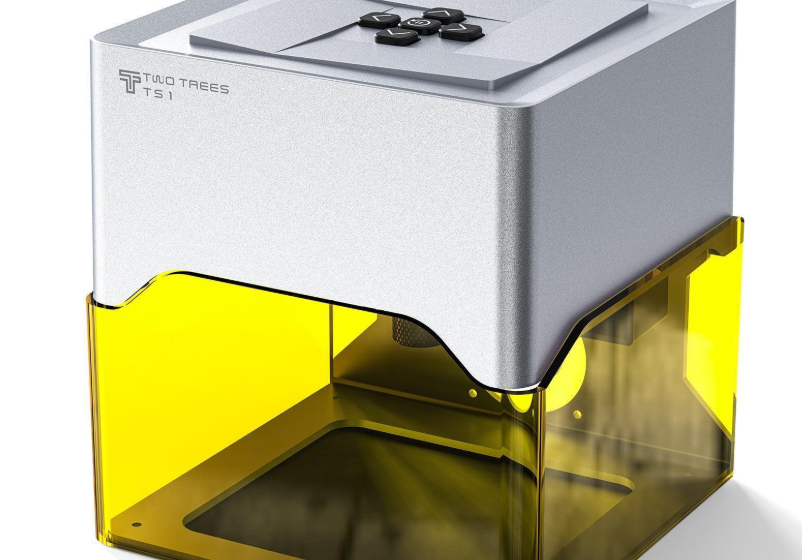

The world of desktop fabrication has made Twotrees laser engravers an interesting option for hobbyists, makers, artists, and small businesses looking to turn digital designs into physical products. From personalized wooden gifts to detailed signs and creative decorations, a compact laser machine can handle projects that would otherwise require considerable manual work. Twotrees offers different machine configurations, allowing users to consider factors such as laser power, working area, engraving speed, and available accessories before choosing a setup.
A diode laser engraver can be particularly useful for people entering laser fabrication because it can perform detailed engraving on suitable materials while occupying considerably less space than many industrial systems. However, different projects require different capabilities. Understanding the difference between machine types, laser output, material compatibility, and accessory options is essential when comparing Twotrees laser engravers for a home workshop or small production environment.
What Are Twotrees Laser Engravers?
Twotrees laser engravers are desktop-oriented machines designed for engraving and, depending on the model and material, cutting applications. The product range includes machines such as the TS1, TS2, and TTS series, giving users multiple configurations for different project requirements. These machines are aimed at applications ranging from personal crafts and personalized gifts to signage, decorative work, and small-business production.
One of the advantages of a desktop laser system is the ability to move from a digital design to a finished object without outsourcing every project. Users can prepare artwork, configure the appropriate laser settings, position the material, and start the engraving process. The exact capabilities depend on the particular machine and laser module, so users should always check the specifications before selecting materials or planning a cutting project.
Understanding the Diode Laser Engraver Technology
A diode laser engraver uses a semiconductor laser source to produce a concentrated beam capable of marking and engraving compatible materials. These machines are popular in the maker community because they can offer a practical balance between machine size, operating requirements, and creative possibilities.
Diode laser technology is especially useful for engraving materials such as wood, plywood, leather, cardboard, and certain coated surfaces. Depending on the laser’s optical power and the characteristics of the material, some machines can also perform cutting operations. However, engraving and cutting are different processes, and cutting generally requires more power, slower movement, multiple passes, or a combination of these factors.
For beginners, this distinction is important. A machine advertised for laser engraving should not automatically be assumed to have the same cutting capabilities as a higher-powered laser cutting machine.
Wood Laser Engraving: A Popular Creative Application
Wood laser engraving remains one of the most accessible and popular applications for desktop diode lasers. Natural wood, plywood, MDF, and related materials can be used to create personalized signs, ornaments, wall decorations, boxes, coasters, plaques, and gift products.
The final appearance depends on several factors, including wood species, surface quality, moisture content, laser power, engraving speed, and image density. A darker engraving does not necessarily mean that the laser should always be operated at maximum power. Finding the correct combination of speed and power is part of developing a reliable workflow.
For example, a maker producing personalized wooden gifts may create a test grid before beginning a larger order. This allows different power and speed combinations to be compared on the actual material. Such testing can reduce wasted material and help produce more consistent results across multiple pieces.
Choosing Between TS1, TS2, and TTS Models
The different Twotrees laser engravers are intended to accommodate different types of users and projects. Instead of selecting a machine solely because it has a higher advertised laser output, buyers should consider the complete workflow they expect to use.
The TS1 can appeal to users looking for a compact machine for everyday engraving and creative projects. A smaller or more straightforward setup may be sufficient for personalized gifts, small signs, ornaments, and hobby work where large working dimensions are not required.
The TS2 and TTS models can provide alternatives for users looking for different combinations of workspace, laser configuration, and machine features. The most suitable model ultimately depends on the dimensions of the products being made and the materials the user expects to process.
Working Area Matters More Than Many Beginners Expect
Laser power receives considerable attention when people compare machines, but the working area can be equally important. A powerful laser is not particularly useful for a project that cannot physically fit within the machine’s usable engraving area.
Someone creating small jewelry boxes or personalized coasters may have little need for an oversized work surface. In contrast, a small business producing larger wooden signs may benefit considerably from a larger engraving area because it can reduce the need to divide artwork into multiple sections.
Before purchasing a machine, users should measure their typical project dimensions rather than choosing based solely on advertised laser power. This approach makes it easier to match the machine to actual production requirements.
Laser Engraving vs. Laser Cutting
Although engraving and cutting are often discussed together, they place different demands on a laser system. Laser engraving generally removes or changes the surface of a material to create an image, pattern, text, or design. Laser cutting attempts to penetrate through the material and therefore requires sufficient optical power and appropriate processing settings.
Material thickness also plays an important role. A diode laser may engrave a particular material effectively but require multiple passes to cut it, while another material may not be suitable for cutting at all. Users should therefore check the manufacturer’s material recommendations and conduct controlled tests rather than assuming that every material can be cut.
Ventilation and safety are also essential when cutting materials. Some materials can release hazardous fumes or produce excessive smoke when heated, so material selection should always be based on known laser compatibility.
Why Laser Engraver Bundles Can Be Useful
For beginners, laser engraver bundles can sometimes provide a more convenient starting point than purchasing a machine and accessories separately. A bundle may combine the main engraving machine with items such as protective equipment, air-assist components, honeycomb working surfaces, rotary accessories, or other useful additions.
The value of a bundle depends on what is actually included. Buyers should compare the contents rather than assuming that a larger bundle automatically represents better value. An accessory that is useful for one type of project may have little benefit for another workflow.
For example, someone focused primarily on wood engraving may prioritize an effective work surface and air-assist setup, while a maker producing cylindrical objects may be more interested in a rotary attachment.
Accessories That Can Expand Creative Possibilities
Accessories can significantly change how a desktop laser is used. A rotary attachment, for instance, can allow compatible machines to work with cylindrical objects instead of limiting the user to flat materials.
Air assistance can also be useful for certain cutting and engraving workflows because it can help manage smoke and debris around the laser’s cutting area. A honeycomb platform can provide a practical working surface while allowing airflow beneath the material.
Protective enclosures are another consideration, particularly for users operating a laser in a home environment. The appropriate safety setup depends on the machine, laser class, workspace, ventilation arrangements, and materials being processed.
Twotrees Laser Engravers for Small Businesses
A desktop laser can be more than a hobby machine. For small businesses, Twotrees laser engravers can potentially be used to create personalized products such as engraved gifts, signs, wedding decorations, nameplates, ornaments, promotional items, and customized wooden products.
The advantage of using a desktop system for personalization is flexibility. A customer can request a name, date, logo, or custom design, and the business can modify the digital artwork without creating a completely new physical production setup.
However, businesses should consider production speed, material costs, maintenance, ventilation, repeatability, and order volume before choosing a machine. A desktop diode laser may be well suited to small orders and customized products, while higher-volume manufacturing may require a different type of laser system.
How to Choose the Right Twotrees Laser Engraver
The best way to compare Twotrees laser engravers is to start with the projects you actually intend to produce. Consider the typical material, maximum material thickness, project dimensions, engraving detail, expected production volume, and available workspace.
Laser output should then be considered alongside the working area and machine features. A higher-powered module can be useful for certain cutting applications, but it does not automatically make a machine better for detailed engraving. Software compatibility is also worth considering because an easy-to-use workflow can make a significant difference for beginners.
Finally, compare the complete package rather than the machine alone. If a laser engraver bundle includes accessories you would otherwise purchase separately, it may provide a more convenient setup. On the other hand, experienced users may prefer selecting individual accessories according to their specific workflow.
Getting Better Results From Wood Laser Engraving
Consistent wood laser engraving requires more than simply selecting a design and pressing start. Different wood species can react differently to the same laser settings, while plywood can vary depending on its internal construction and surface veneer.
Start with small material tests and gradually adjust speed, power, and passes. Keeping notes about successful settings can make repeat orders much easier because you can return to proven parameters instead of starting from scratch.
Cleaning the material and maintaining the machine also matter. Smoke residue can affect the appearance of engraved surfaces, while accumulated dust can interfere with machine components and the overall workshop environment.
Final Thoughts on Twotrees Laser Engravers
Twotrees laser engravers offer a range of desktop-oriented options for makers, hobbyists, artists, and small businesses interested in personalized products and digital fabrication. From wood laser engraving and decorative projects to selected cutting applications, a suitable diode laser can provide considerable creative flexibility without requiring an industrial-scale workshop.
When comparing models such as the TS1, TS2, and TTS series, buyers should look beyond laser power and consider working area, material compatibility, software, accessories, safety requirements, and the type of products they actually plan to make. Laser engraver bundles can simplify the initial setup, while additional accessories can expand the range of possible projects.
The right machine is ultimately the one that matches the user’s materials, project dimensions, production expectations, and workflow. By understanding these factors before purchasing, makers can choose a diode laser engraver that supports their creative goals while providing room to develop more advanced engraving and cutting techniques over time.