
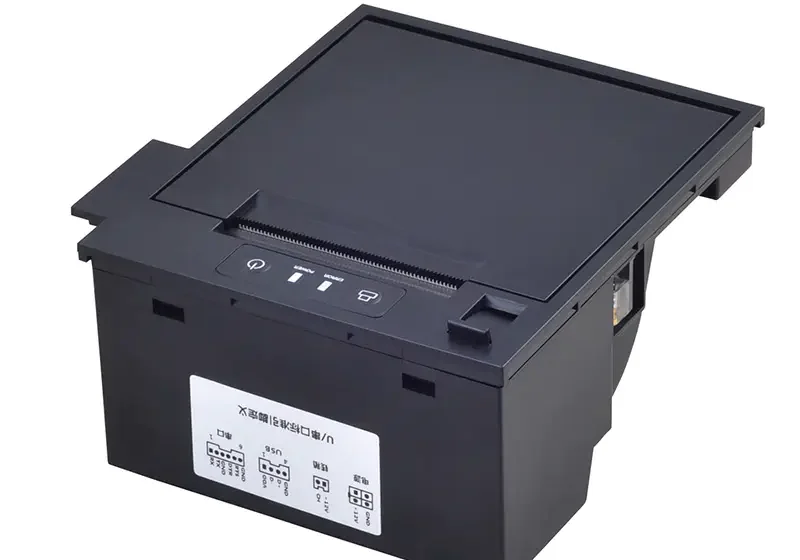

Printing speed is an important consideration when designing or upgrading self-service equipment. In busy environments, customers expect receipts, tickets, order slips, or queue numbers to be produced quickly without unnecessary waiting.
A Thermal Kiosk Printer can provide fast output, but its actual performance depends on more than the printer’s rated speed. Paper characteristics, document length, print density, communication speed, mechanical design, and operating conditions can all influence how quickly a completed document is produced.
Understanding Kiosk Printer Speed
Printer speed is commonly expressed in millimeters per second (mm/s). This measurement indicates how quickly the printer can move media through the printing mechanism under specified conditions.
However, the rated maximum speed does not necessarily represent the time a customer waits for a finished ticket or receipt. The complete process can include data transmission, paper positioning, printing, cutting, and other operations.
Printhead Technology
The thermal printhead is one of the main components affecting printing performance. It contains heating elements that create the printed image as the paper passes beneath them.
A printhead designed for high-speed operation can process thermal media efficiently while maintaining the required print quality. The relationship between printhead resolution, heating time, and paper movement can influence overall performance.
Print Density
The amount of information being printed can affect output speed. A document containing simple text may require less processing than one containing dense graphics, logos, barcodes, or QR codes.
Higher print density can require more heating activity across the printhead. Depending on the printer’s design and configuration, this may reduce the maximum practical printing speed.
Document Length
Short tickets and receipts can be completed quickly, while longer documents naturally require more time.
For example, a queue ticket containing only a number may take considerably less time to produce than a detailed transaction receipt containing multiple lines of text and several graphics.
Businesses should therefore evaluate speed based on typical document length rather than relying only on the printer’s maximum specification.
Paper Quality and Type
Thermal paper characteristics can influence how efficiently a printer operates. The paper must have suitable thermal sensitivity, thickness, width, and surface characteristics.
Paper that does not match the printer’s requirements may cause inconsistent feeding or require different print settings. These issues can affect overall performance and may increase the likelihood of interruptions.
Paper Feed Mechanism
The paper feed system controls how quickly and accurately media moves through the printer.
Motors, rollers, gears, and control electronics all contribute to feeding performance. A well-designed mechanism can maintain consistent movement while reducing the risk of paper slipping, misalignment, or unnecessary pauses.
Reliable feeding is especially important in high-volume kiosk environments.
Communication Interface
The printer must receive data from the kiosk’s computer or controller before printing can begin. The communication interface can therefore affect the overall response time.
USB, serial, Ethernet, and other interfaces can have different data-transfer characteristics. In most modern applications, the interface itself may not be the main limitation, but inefficient communication protocols or large print data files can still introduce delays.
Data Processing
Printing speed is also influenced by how the kiosk software prepares print data.
Before the thermal mechanism begins printing, the system may need to generate text, images, barcodes, or QR codes and convert them into a format the printer understands.
Efficient software and suitable printer command languages can reduce processing delays and help the system respond more quickly.
Cutter Operation
Many kiosk printers include an automatic cutter. After printing is complete, the cutter must separate the ticket or receipt before the customer can collect it.
The cutter’s operating time adds to the total transaction cycle. In high-volume applications, a fast and reliable cutter can help maintain efficient service.
Printer Configuration
Printer settings can affect the balance between speed and print quality.
For example, print density or darkness settings may change how the thermal printhead operates. Higher darkness levels can sometimes require more heating and may affect the practical printing rate.
The ideal configuration depends on the paper and the document being printed.
Power Supply
A stable and appropriate power supply is important for consistent printer performance. Thermal printheads and motors require sufficient electrical power during operation.
If the power system is poorly matched to the printer’s requirements, the mechanism may not operate at its intended performance level.
Kiosk designers should ensure that the printer receives the voltage and current specified by its technical documentation.
Operating Temperature
Environmental conditions can also influence printer performance. Thermal printing mechanisms are designed to operate within specified temperature and humidity ranges.
Extreme conditions can affect paper characteristics, mechanical movement, and thermal response. Kiosks installed outdoors or in industrial environments may therefore require additional consideration of environmental specifications.
Paper Roll Size and Replacement
Although paper roll capacity does not directly determine printhead speed, it can affect the overall efficiency of kiosk operation.
A larger compatible roll may reduce the frequency of paper replacement. Fewer maintenance interruptions can improve the effective availability of a kiosk, particularly in locations with heavy customer traffic.
Mechanical Wear
Printer components can experience wear over time, especially in systems that operate continuously.
Worn rollers, cutters, gears, or other mechanical parts may cause feeding problems and slow down the printing cycle. Regular maintenance and timely replacement of worn components can help preserve consistent performance.
Firmware and Software Optimization
Firmware controls many of the printer’s core functions, including paper movement, printhead operation, sensor monitoring, and cutter control.
Well-optimized firmware can coordinate these operations efficiently. Similarly, kiosk software can reduce delays by sending properly formatted data and avoiding unnecessary processing steps.
Performance should therefore be considered as a combination of hardware and software rather than a single printer specification.
How to Improve Practical Printing Speed
Businesses looking to improve kiosk response times can evaluate the complete printing workflow.
Useful steps include:
- Select a printer with a suitable rated speed.
- Use compatible, high-quality thermal paper.
- Keep print layouts as efficient as possible.
- Avoid unnecessarily large graphics.
- Optimize barcode and QR code formatting.
- Maintain rollers and other moving components.
- Keep the printhead clean according to manufacturer recommendations.
- Use an appropriate power supply.
- Configure print density according to the required output quality.
- Test the complete kiosk workflow under realistic usage conditions.
Rated Speed vs. Real-World Performance
It is important to distinguish between theoretical printer speed and actual transaction time.
A printer may have a high maximum millimeter-per-second rating, but customers experience the complete process from selecting an option to receiving the finished document.
For this reason, businesses should measure the entire workflow during testing. Data processing, communication, paper feeding, printing, cutting, and document collection should all be considered.
Choosing a Printer for High-Speed Applications
When speed is a major requirement, buyers should look beyond a single specification. The printer should provide the necessary combination of printing speed, reliability, print quality, and mechanical durability.
Applications such as transportation ticketing, fast-food ordering, parking systems, and high-volume retail kiosks may benefit from mechanisms designed specifically for frequent and rapid printing.
Conclusion
Thermal kiosk printer speed depends on a combination of hardware, software, media, and operating conditions. Printhead technology, print density, document length, paper quality, feeding mechanisms, communication interfaces, cutter performance, power supply, and maintenance can all affect the final output time.
Rather than evaluating speed solely by a manufacturer’s maximum rating, businesses should test the printer within the actual kiosk workflow. This provides a more realistic understanding of how quickly customers will receive their tickets, receipts, or other printed documents.