
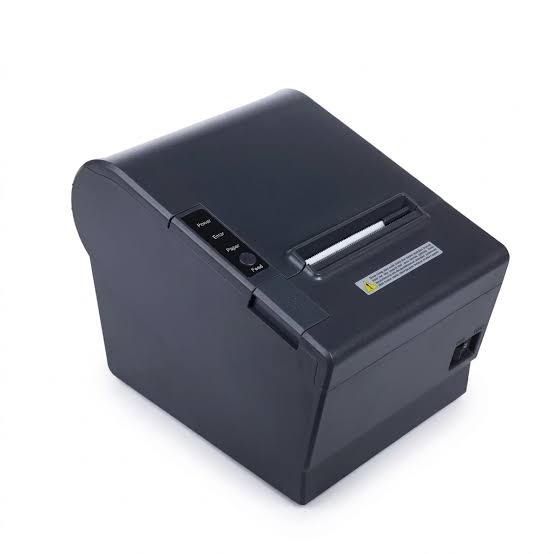

Thermal printing is an important part of daily operations in industries such as retail, logistics, manufacturing, healthcare, and warehousing. Businesses use thermal printing equipment to produce receipts, shipping labels, product identification tags, barcodes, and other essential documents. However, choosing the right printer can be challenging because different models are designed for different workloads and operating environments.
Desktop and industrial thermal printers are two common options. Both use heat-based printing technology, but they differ in size, construction, printing capacity, durability, and intended applications. Understanding these differences helps businesses select a Thermal Printer that meets their operational requirements without paying for unnecessary capabilities or choosing equipment that cannot handle their workload.
What Is a Desktop Thermal Printer?
<AsyncImage query=”compact desktop thermal label printer on clean office desk printing barcode labels” aspectRatio=”16:9″ width=”100%”/>
A desktop thermal printer is a compact printing device designed for light to moderate printing volumes. It is commonly used in small businesses, retail counters, offices, clinics, and other environments where printing requirements are relatively consistent and manageable.
Desktop models generally have a smaller footprint than industrial printers, making them suitable for workstations with limited space. They are often easy to install and operate, and many models support USB, Ethernet, Bluetooth, or Wi-Fi connectivity.
Key Features of Desktop Thermal Printers
- Compact design that fits on counters and desks.
- Relatively simple installation and operation.
- Suitable for light to moderate daily printing.
- Lower initial equipment cost in many product ranges.
- Support for common receipt or label formats.
- Convenient media replacement and routine maintenance.
Desktop printers are useful when businesses need dependable printing without the capacity or physical size of industrial equipment.
What Is an Industrial Thermal Printer?
<AsyncImage query=”industrial thermal transfer barcode label printer heavy duty warehouse production floor” aspectRatio=”16:9″ width=”100%”/>
An industrial thermal printer is designed for demanding environments and higher-volume printing operations. These machines are commonly used in warehouses, distribution centers, factories, large retail facilities, and logistics operations.
Industrial models usually feature stronger construction, larger media capacities, and mechanisms designed to support extended operating periods. Depending on the model, they may also offer advanced connectivity, wider media support, and integration with business systems.
Key Features of Industrial Thermal Printers
- Durable construction for demanding workplaces.
- Support for high-volume printing workloads.
- Larger paper and label roll capacity.
- Designed for extended operating schedules.
- Advanced connectivity and system integration options.
- Support for a wider range of media in selected models.
- Greater flexibility for specialized labeling applications.
Industrial printers are generally more suitable for organizations that need consistent output across long production shifts or large-scale distribution processes.
Desktop vs. Industrial Thermal Printers: Key Differences
Although both printer categories use thermal technology, their specifications and operating capabilities can vary considerably.
| Comparison Factor | Desktop Thermal Printer | Industrial Thermal Printer |
|---|---|---|
| Design | Compact and lightweight | Larger and heavier |
| Printing volume | Light to moderate | Moderate to high, depending on model |
| Construction | Designed for regular office or counter use | Built for more demanding environments |
| Media capacity | Usually smaller rolls | Often supports larger rolls |
| Operating schedule | Suitable for intermittent or regular use | Suitable for extended workloads within rated specifications |
| Initial cost | Generally lower | Generally higher |
| Maintenance | Usually straightforward | May require more specialized servicing |
| Installation space | Limited | Requires more workspace |
| Common applications | Retail counters, offices, small businesses | Warehouses, factories, distribution centers |
These are general distinctions. Actual performance depends on the specific model, manufacturer specifications, and operating conditions.
1. Printing Volume and Daily Workload
Printing volume is one of the most important factors when comparing desktop and industrial thermal printers.
Desktop Printer Capacity
Desktop printers are suitable for businesses that produce a manageable number of receipts or labels each day. A small retail store, for example, may use a desktop model to print customer receipts and occasional product labels.
They can also support offices and clinics that need identification labels or administrative documents without continuous high-volume production.
Industrial Printer Capacity
Industrial printers are designed for more demanding workloads. A warehouse may need to print hundreds or thousands of shipping labels during a busy shift, while a manufacturing facility may require continuous product identification throughout production.
Their construction and media capacity make them better suited to these environments, provided the selected model meets the required duty cycle.
Which should you choose? Select a desktop printer for lower-volume operations. Consider an industrial model when printing is a frequent, essential part of a large-scale workflow.
2. Durability and Construction Quality
The physical environment in which a printer operates can influence its service life and maintenance requirements.
Desktop printers are generally designed for controlled environments such as offices, retail counters, and indoor workstations. Their compact construction is practical for everyday use, but they may not be suitable for locations with excessive dust, vibration, or demanding operating conditions.
Industrial printers typically use more robust housings and components to support challenging workplace conditions. Some models are designed with features that help protect internal mechanisms from environmental contaminants.
Businesses should still check the specific protection ratings and operating limits of each model rather than assuming every industrial printer is suitable for harsh environments.
3. Printing Speed and Productivity
Printing speed affects how quickly employees can complete transactions, prepare shipments, or identify products.
Desktop printers provide suitable speeds for many everyday printing tasks. They can handle routine receipt and label production without requiring a large industrial machine.
Industrial printers are often available with higher maximum print speeds and are designed to support more demanding production requirements. This can help reduce waiting time in warehouses and manufacturing facilities.
However, actual printing speed depends on resolution, label size, media type, connectivity, and content complexity. A higher rated speed does not automatically guarantee better performance for every application.
4. Media Capacity and Roll Replacement
<AsyncImage query=”desktop and industrial thermal label printer media roll capacity comparison” aspectRatio=”16:9″ width=”100%”/>
Media capacity is another important difference between these printer categories.
Desktop printers usually support smaller rolls because their internal compartments are designed to keep the equipment compact. This means employees may need to replace paper or labels more frequently during busy periods.
Industrial printers commonly support larger media rolls and may offer additional media-handling options. This reduces interruptions caused by frequent roll replacement and can improve productivity in high-volume environments.
For businesses printing throughout the day, larger media capacity can be an important operational advantage.
5. Initial Purchase Cost and Total Cost of Ownership
Desktop printers generally have a lower initial purchase price, making them attractive to startups, small retailers, and businesses with limited printing needs.
Industrial printers usually require a larger initial investment because they are designed for more demanding workloads and may include additional features.
However, purchase price alone does not determine which option is more economical.
Businesses should consider the total cost of ownership, including:
- Initial equipment purchase.
- Paper, labels, and ribbons.
- Printhead and roller replacement.
- Routine maintenance.
- Installation and integration.
- Employee time spent replacing media.
- Downtime and lost productivity.
- Expected equipment service life.
A desktop printer may offer better value for a small operation, while an industrial model may be more cost-effective for a facility that needs frequent, high-volume printing.
6. Maintenance and Repair Requirements
Both desktop and industrial thermal printers require routine maintenance to maintain consistent printing quality.
Desktop printers are often relatively straightforward to clean and maintain. Users can perform basic tasks such as removing paper scraps, cleaning the printhead, inspecting the platen roller, and checking media alignment.
Industrial printers may involve more complex mechanisms and additional media-handling components. Their maintenance requirements can vary according to operating volume and workplace conditions.
A suitable maintenance routine should include:
- Cleaning the printhead according to manufacturer instructions.
- Inspecting the platen roller for wear.
- Checking sensors and media guides.
- Removing dust and adhesive residue.
- Monitoring printing quality.
- Inspecting power and communication connections.
- Following recommended service intervals.
Businesses with critical production requirements should also consider spare parts availability and access to qualified technical support.
7. Connectivity and System Integration
Modern thermal printers can connect to computers, point-of-sale systems, warehouse management platforms, and other business applications.
Desktop printers commonly provide USB connectivity, while selected models also support Ethernet, Bluetooth, or wireless connections. These options are often sufficient for small businesses and individual workstations.
Industrial printers may offer broader integration capabilities, including network connectivity and support for enterprise printing environments. Depending on the model, they may work with warehouse management systems, manufacturing software, and automated labeling workflows.
Before purchasing, businesses should confirm compatibility with their operating systems, printing applications, and existing infrastructure.
8. Print Resolution and Label Quality
Resolution determines how much detail a printer can reproduce and is commonly measured in dots per inch (DPI).
Both desktop and industrial printers are available with different resolution options. Common specifications include 203 DPI and 300 DPI, while some specialized models offer higher resolutions.
A desktop printer with suitable resolution may be entirely adequate for ordinary shipping labels, retail receipts, and basic product identification.
Industrial printers may offer a wider range of configurations for specialized labeling tasks, although this depends on the product range.
When selecting a resolution, consider the smallest text, barcode dimensions, and graphics that need to be printed. Higher resolution is particularly useful for compact labels, but it may not be necessary for standard applications.
9. Applications of Desktop Thermal Printers
<AsyncImage query=”small retail shop POS desktop thermal receipt printer printing customer receipt” aspectRatio=”16:9″ width=”100%”/>
Desktop printers are suitable for many everyday business applications where space and workload requirements are relatively limited.
Small Retail Stores
Small retailers use desktop receipt printers to produce transaction records, payment confirmations, and customer receipts.
Offices
Office environments may use desktop label printers for file identification, asset tracking, and package labeling.
Clinics and Medical Offices
Clinics can use suitable desktop models to print appointment labels, administrative records, and identification tags, subject to their operational and regulatory requirements.
Small E-Commerce Businesses
Online sellers may use desktop label printers to produce shipping labels and order identification documents.
Restaurants and Cafes
Compact thermal receipt printers can support order tickets and customer transaction printing at counters.
10. Applications of Industrial Thermal Printers
<AsyncImage query=”industrial barcode thermal label printer operating in manufacturing warehouse facility” aspectRatio=”16:9″ width=”100%”/>
Industrial printers are better suited to environments where printing volume, durability, and workflow continuity are important.
Warehousing and Distribution
Distribution centers use industrial printers to produce shipping labels, pallet tags, inventory labels, and barcode identification materials.
Manufacturing Facilities
Factories use industrial label printers to identify components, production batches, finished goods, and packaging.
Large Retail Operations
Large retail organizations may require industrial equipment for centralized label production, inventory management, and distribution workflows.
Logistics Companies
Logistics operations often need reliable printing of tracking labels and shipment identification information throughout the day.
Pharmaceutical and Product Identification
Certain manufacturing and packaging environments require detailed identification labels. Industrial printers with appropriate resolution and media compatibility can support these requirements.
11. Space Requirements and Workplace Installation
Physical space can influence the choice between desktop and industrial equipment.
Desktop printers are designed for workstations with limited space. They can usually be placed on a counter, shelf, or office desk, making installation relatively convenient.
Industrial printers require more room because of their larger size and media-handling arrangements. Businesses should also consider access for loading rolls, replacing ribbons, performing maintenance, and connecting cables.
Before purchasing, measure the available workspace and compare it with the printer’s dimensions and recommended installation requirements.
12. How to Decide Which Printer Is Right for Your Business
The best option depends on the relationship between printing volume, workplace conditions, media requirements, and available budget.
Consider the following questions before making a decision:
How many labels or receipts do you print daily? A small workload may not justify industrial equipment, while continuous high-volume printing may exceed the practical capacity of a desktop model.
How long does the printer operate each day? Businesses that print throughout multiple shifts should consider models designed for extended operating schedules.
What type of media do you use? Check the supported paper widths, label sizes, roll capacities, and ribbon requirements.
Where will the printer be installed? A clean office may only require desktop equipment, whereas a demanding warehouse environment may need a more robust design.
What software must the printer support? Confirm compatibility with POS, inventory, shipping, and warehouse management systems.
What is the available budget? Compare initial costs with consumables, maintenance, and expected productivity over the equipment’s service life.
13. Common Purchasing Mistakes to Avoid
Selecting a printer without evaluating actual business requirements can create unnecessary expenses or performance problems.
Choosing Based Only on Purchase Price
A low-cost printer may be attractive initially, but it may not provide enough capacity for a growing operation. Consider long-term expenses and workload requirements.
Buying More Capacity Than Necessary
An industrial printer may offer advanced features that a small business never uses. Purchasing equipment beyond operational needs can increase costs without delivering meaningful benefits.
Ignoring Media Compatibility
Not all printers support the same paper widths, label materials, or ribbon types. Check technical specifications before ordering consumables.
Overlooking Connectivity Requirements
A printer that cannot integrate with existing business software may create additional setup work or require alternative equipment.
Neglecting Technical Support
Warranty coverage, replacement parts, and service availability can influence long-term operating costs. Evaluate these factors before selecting a model.
14. Can a Business Start with a Desktop Printer and Upgrade Later?
Some businesses begin with desktop printers because their initial printing requirements are relatively small. As order volumes increase, they may eventually need industrial equipment.
This approach can be practical when the business has a clear growth plan and the desktop printer can comfortably support current demand.
However, upgrading should not be delayed until printing problems regularly interrupt operations. Businesses should monitor daily output, media replacement frequency, equipment workload, and downtime.
If the existing printer consistently struggles to meet demand, moving to an industrial model may improve productivity and provide greater operational flexibility.
Conclusion
Desktop and industrial thermal printers serve different business requirements. Desktop models offer compact designs, straightforward operation, and lower initial costs, making them suitable for small businesses, retail counters, offices, and moderate printing workloads. Industrial models provide more robust construction, larger media capacity, and support for demanding printing environments.
The right choice depends on daily printing volume, operating schedules, workplace conditions, media requirements, connectivity, and total cost of ownership. Businesses should evaluate these factors carefully rather than selecting equipment based only on price or maximum printing speed.
By matching printer capabilities to actual operational needs, organizations can maintain reliable printing performance, reduce unnecessary expenses, and support efficient business workflows.